
Table of Contents
Introduction
AI images have truly taken the internet by storm. Every single day, fresh visuals pop up on Instagram, TikTok, Pinterest, and WhatsApp. The magic behind many of these stunning images? It’s all thanks to ChatGPT image prompts. Fast forward to 2026, and these prompts are more powerful, more imaginative, and more shareable than ever!
In this guide, you’ll uncover the hottest ChatGPT image prompts that are trending right now, learn how to craft them, fine-tune them for social media, and create images that people just can’t resist sharing.
So, let’s jump into the exciting realm of viral AI imagery! More Reading. ChatGPT 2025 Latest Updates: New features U.S. users need now.
What Are ChatGPT Image Prompts in 2026?
ChatGPT image prompts are basically the text instructions you provide to ChatGPT, allowing it to whip up polished, high-quality prompts for various image models, such as:
- OpenAI Image Model
- Midjourney
- Stable Diffusion
- Leonardo AI
- Ideogram
- Adobe Firefly
It’s important to note that ChatGPT doesn’t actually create the final image. Instead, it crafts the ideal prompt that you can then plug into your favorite image generator.
So, why is this handy?
Well, ChatGPT has a knack for understanding style, lighting, camera angles, aesthetics, emotions, and the latest social media trends. It can effortlessly transform your idea into a studio-quality image prompt.
This means that creating images becomes quicker, smarter, and way more precise!
Why AI Image Prompts Are Going Viral Right Now
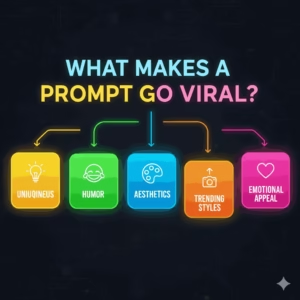
Viral images have a knack for sparking a reaction. They evoke feelings of curiosity, nostalgia, inspiration, or even a good laugh. As we look ahead to 2026, three key factors are catapulting AI images to the forefront of every platform:
1. Visual-first algorithms
Social media is all about the visuals. Platforms prioritize images over text, and AI-generated pictures catch the eye right away, leading to greater reach.
2. No design skills required
Creating stunning artwork is now within everyone’s grasp. You don’t need a fancy camera, Photoshop, or any design experience—just a simple prompt will do.
3. Fresh trends popping up weekly
Challenges like:
- “AI glow-up portraits”
- “Future self in 2050”
- “Pixar-style family photos”
- “Old money selfies”
- “Dream wedding photos”
These trends go viral all the time, driving huge engagement.
How ChatGPT Writes Viral Image Prompts (The Simple Framework)
You don’t need to get bogged down with complicated formulas. What you really need is a straightforward structure.
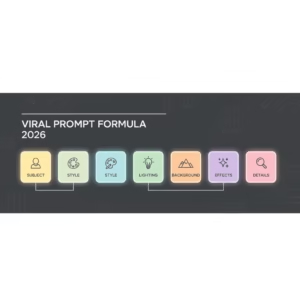
Here’s a 6-part framework for creating viral prompts:
Subject + Action + Style + Camera + Lighting + Extra Details
Example:
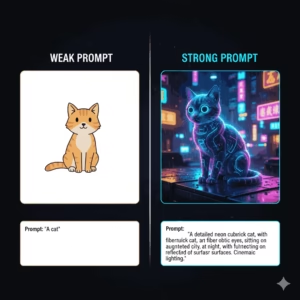
“A 23-year-old woman smiling gently, in a cinematic portrait style, captured with an 85mm lens, bathed in warm golden-hour lighting, featuring a soft depth of field and ultra-detailed skin texture — Instagram portrait 4:5.”
This approach provides the image generator with clear guidance, ensuring you get the results you want without any randomness. More Reading. Best ChatGPT 2026 Prompts for Content Creation- Complete guide
Best Viral ChatGPT Image Prompts for 2026 (Copy & Paste)
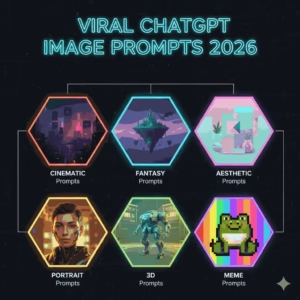
Below are 25 prompts, organised by category. You can copy and paste them directly into your image generator.
Viral Instagram Portrait Prompts
1.
“Aesthetic portrait of a young woman in soft pastel tones, with a dreamy background blur, shot with an 85mm lens, featuring soft glowing light, ultra-detailed skin, and a gentle smile — perfect for a 4:5 Instagram portrait.”
2.
“Old-money style portrait showcasing an elegant neutral outfit against a vintage European backdrop, bathed in soft natural lighting, with a film texture that gives off a luxury fashion vibe — 4:5.”
3.
“Hyper-realistic portrait of a man with a sharp jawline, using muted tones and cinematic shadows for crisp detail, all in a modern editorial style.”
TikTok / Reels Viral Prompts
4.
“A dynamic action scene of a woman spinning in slow motion, illuminated by neon city lights, featuring high contrast and a futuristic energy, formatted for 9:16 Reels.”
5.
“An epic transformation glow-up, showcasing a before-and-after style with bright flares, a clean gradient background, and bold colors.”
Pinterest-Friendly Image Prompts
6.
“A minimalist home office setup with a warm beige palette, a clean desk layout, and sunlight streaming through the curtains, creating that perfect aesthetic Pinterest vibe.”
7.
“A dreamy travel destination mood board, featuring soft vintage film tones, handwritten text overlays, and a curated pastel color scheme.”
WhatsApp DP / Profile Picture Prompts
8.
“A sharp close-up portrait with vibrant colors, crystal-clear eyes, and a soft bokeh background, all in high contrast — ideal for a profile picture.”
9.
“A minimal black-and-white profile headshot, rich in detail, with soft shadows that create an elegant mood.”
Fantasy / Aesthetic Art Prompts
10.
“A fierce warrior princess clad in shimmering silver armor, wielding a glowing sword, with dramatic mountains looming in the background and stormy skies overhead, all captured in cinematic lighting.”
11.
“A mystical forest spirit with radiant eyes, surrounded by swirling leaves, embodying an ethereal fantasy style.”
Product & E-commerce Prompts
12.
“A skincare product elegantly displayed on a glossy surface, adorned with water droplets, showcasing a minimalist luxury style under soft studio lighting.”
13.
“Stylish shoes seemingly floating in mid-air, outlined in neon, casting dynamic shadows, all in a bold modern aesthetic.”
Retro / Vintage Prompts
14.
“A portrait styled like a 90s magazine cover, featuring bold typography and a grainy film texture that evokes classic nostalgia.”
15.
“A vibrant 1980s nightlife scene, bursting with a retro synthwave color palette and illuminated by glowing signs.”
Cute / Aesthetic Prompts for Social Media
16.
“A cute, kawaii-style cat joyfully holding a cup of bubble tea, surrounded by pastel colors and soft lighting.”
17.
“Aesthetic flat-lay of a journal setup, complete with stickers and pastel stationery, captured in a clean overhead shot.”
Professional / Corporate Prompts
18.
“A polished corporate headshot with a neutral backdrop, dressed in professional attire, illuminated by soft studio lighting.”
19.
“A contemporary team photo taken in natural light, showcasing friendly smiles and a diverse group.”
Kids & Family Prompts
20.
“A Pixar-inspired family portrait featuring soft lighting, delightful smiles, and a warm color scheme.”
21.
“A cute cartoon baby nestled in a pastel nursery, sporting an adorable expression and bathed in soft light.”
Travel & Landscape Prompts
22.
“A breathtaking mountain sunrise painted in shades of orange and pink, with sharp details and a cinematic feel.”
23.
“A stunningly clear blue beach with gentle waves, soft reflections, and a vibe that screams tropical paradise.”
Ultra-Creative / Experimental Prompts
24.
“A portrait crafted from shattered glass pieces, creating abstract reflections with high-contrast lighting.”
25.
“A neon holographic face adorned with glitch effects, evoking a futuristic sci-fi atmosphere.”
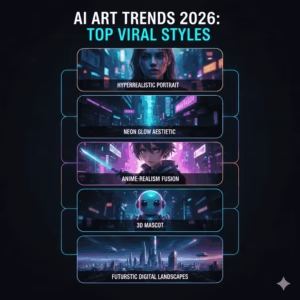
Platform-Specific Tips for Stronger Results. ChatGPT Image Prompts
When it comes to getting the best results on different platforms, each one has its own visual preferences. Here are some handy tips to help you shine!
Instagram Tips
- Embrace warm lighting for a cozy vibe.
- Get up close and personal with your subject.
- Stick to the 4:5 format for that perfect look.
The ideal Instagram aspect ratio is:
👉 1080×1350 (4:5)
TikTok / Reels Tips
- Infuse some motion to keep things lively.
- Boost the contrast to make your visuals pop.
- Bright colors are your best friend!
- Remember to format your videos at 9:16.
Pinterest Tips
- Soft, pastel colors work wonders.
- Don’t shy away from negative space; it adds elegance.
- Opt for tall formats to catch the eye.
- Incorporate aesthetic objects for that extra charm.
WhatsApp DP Tips
- Go for close-up shots to capture attention.
- Keep backgrounds simple and uncluttered.
- Make sure to focus on the eyes for a strong connection.
How to Make Your AI Images Rank on Google. ChatGPT Image Prompts
Want to get your AI images to rank on Google? It’s totally doable if you optimize them the right way!
Here’s how you can do it:
✔ Make sure to use the keyword “ChatGPT image prompts” in the alt text.
✔ Give your images descriptive filenames, like “aesthetic-instagram-ai-portrait-2026.webp.”
✔ Compress your images to formats like WebP or AVIF.
✔ Don’t forget to add ImageObject schema.
✔ Position your images close to relevant content.
✔ Choose a fast hosting service.
Following these steps can help your blog show up in Google Images, which means more traffic for you!
Legal and Ethical Tips
Creating images with AI can be a blast, but it’s important to keep safety in mind:
- Avoid mimicking the unique styles of real photographers.
- Don’t create images of minors in inappropriate situations.
- Steer clear of making deepfakes of celebrities.
- Always check the usage license for the image model you’re using.
- Make sure you’re following the guidelines of the platform you’re on.
If you’re selling AI-generated images, be sure to include a brief disclosure.
How to Make Money With ChatGPT Image Prompts
Looking to cash in on ChatGPT image prompts? Here are some straightforward ways to turn those images into a source of income:
1. Sell prompt packs
Platforms like Gumroad and Etsy are perfect for this!
2. Offer AI portrait services
People are willing to pay for custom display pictures and profile photos.
3. Build niche image packs
Think along the lines of:
- Wedding photo mockups
- Kids cartoon portraits
- Retro cover art
- Uplifting motivational posters
4. Use AI images for affiliate marketing
Design product mockups and link your affiliate products right underneath.
5. Sell social media templates
Canva-style presets are all the rage these days!
Real-Life Examples of AI Image Success
Case Study 1: A Creator Who Grew 200K Followers
One creator shared “Old Money AI Portraits” every day. Each post reached a wide audience because people are drawn to elegant, aesthetic visuals.
Case Study 2: A Small Shop Boosted Sales by 40%
A small skincare brand utilized AI-generated product images. Their ads had a high-end look. As a result, their conversion rates soared.
Case Study 3: A Freelancer Selling AI DPs
A freelancer managed to sell over 500 AI-generated profile pictures in just a month by providing personalized portraits.
Best Tools for Making AI Images in 2026
Here are the top tools:
- OpenAI Image Generator
- Midjourney v6+
- Stable Diffusion XL
- Leonardo AI
- Adobe Firefly
- Ideogram
Pair these with ChatGPT prompts and you get amazing results.
FAQ: ChatGPT Image Prompts in 2026
1. Can ChatGPT create images directly?
Absolutely! The newest version can either generate images or craft prompts for image models.
2. Are these prompts free to use?
You bet! Prompts are just text, so feel free to use them anywhere you like.
3. Are AI images allowed on Instagram?
Yes, they are! Just make sure to follow the content guidelines.
4. What’s the best aspect ratio for social media?
Instagram: 4:5
TikTok: 9:16
Pinterest: 2:3 or 9:16
5. How long should a prompt be?
A concise, specific prompt is ideal. Aim for around 20–40 words.
6. Can I use AI images commercially?
Be sure to check the tool’s license. Most models do allow for commercial use.
7. How do I avoid weird or distorted results?
To get the best results, make sure to include:
- Clear face details
- Camera settings
- Lighting
- Negative prompts
8. Should I disclose AI-generated images?
Definitely! It helps build trust with your audience.
Conclusion. ChatGPT Image Prompts
By 2026, AI-generated images have become a common sight. Thanks to ChatGPT’s image prompts, anyone can whip up eye-catching visuals that have the potential to go viral. Whether you’re after breathtaking portraits, stylish thumbnails for reels, Pinterest-worthy aesthetics, or product photography, the right prompt can truly elevate your creations.
So, dive into those prompts. Experiment, tweak, and find your unique flair. This is the ideal moment to explore the world of AI imagery and grow your audienc
CTA. ChatGPT Image Prompts
🔹 “Want to try this prompt? Copy, paste, and generate your image instantly.”
🔹 “Save this prompt list — you’ll want it later!”
🔹 “Use this viral prompt and watch your images blow up on social media.”
External Links
1. OpenAI – Official Documentation
2. Google AI – Latest AI Research & Trends
About the Author
👤 Muhammad Ibrahim – Founder of Mindliftly
Muhammad Ibrahim is a technology writer and wellness advocate who loves to dig deeper into the potential of AI to enhance mental well-being, productivity, and personal growth. An experienced researcher with years of tracking emerging technologies, he brings scientific perspective and actionable strategies to guide readers to understand AI-fueled tools for daily calm and clarity.
Through Mindliftly, Ibrahim offers guides, comparisons, and action plans that link AI innovation to people’s well-being. His vision is straightforward: to enable humans to live more conscious, stress-free lives through responsible and effective use of AI.
📩 Connect with Muhammad:
- Website: Mindliftly.com


