
Table of Contents
Introduction
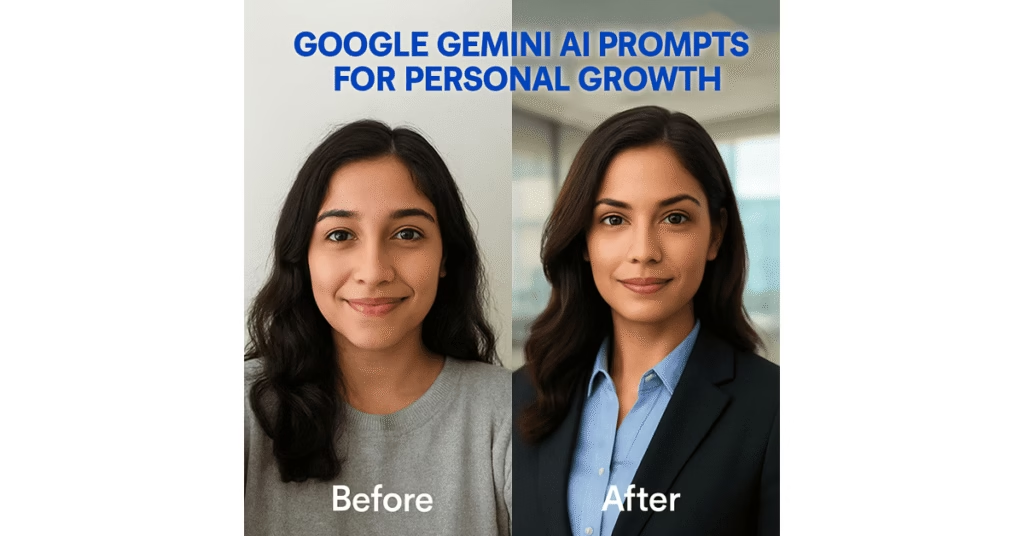
The internet is buzzing with the Google Gemini AI Editor trend. From the playful Nano Banana avatars to cinematic 3D figurines, people worldwide are using Gemini’s creative prompts to transform their photos. But here’s something most don’t realize: these same prompts can become powerful personal growth tools.
Here in this article, we are going to see how you can utilize Google Gemini AI Editor prompts to imagine your best self, reinforce motivation, minimize stress, and escalate your self-improvement path to the next level.
1. What is Google Gemini AI Editor?
Google Gemini, the latest AI model from the tech giant, is not limited to text and chat—it also fuels a creative AI Editor. Through this, users can turn selfies into personalized styles: vintage Bollywood posters, holiday outfits, futuristic avatars, or even tradable 3D miniatures.
This phenomenon—commonly referred to as the Nano Banana mania—is more than mere entertainment. It taps a profound impulse: the need to perceive ourselves in different ways, to communicate identity, and to try on different self-images. And that’s ideal for use in personal development.
2.The Psychology of Visualization & AI
Visualization has been an established psychology and coaching method for decades. Sports players visualize winning movements prior to games. Business owners visualize business success prior to opening. Why? Because the mind tends to react to imagined situations as if they are actually happening.
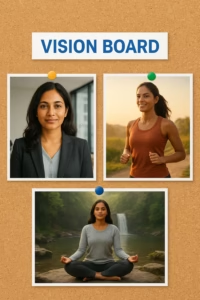
By generating images of your “future you” through AI prompts, you’re essentially making a vision board in digital form. You don’t have clouds of vague thoughts, but rather a clear, individualized image of:
- The healthier, fitter you.
- The confident public speaker.
- The calm, mindful version of you.
- The successful leader or entrepreneur.
This isn’t fantasy—it’s a potent mental rehearsal that can increase confidence, boost motivation, and make goals feel more within reach.
3. Best Google Gemini AI Editor Prompts for Personal Growth
Here are some pre-written personal growth prompts you may want to try:
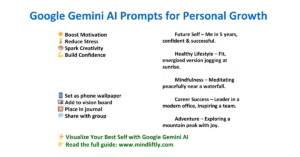
- Future Self Prompt
- “Build a picture of me in five years, assertive and triumphant in my ideal career.”
- Healthy Lifestyle Prompt
- “Turn my photo into a healthy, vibrant version of me running at dawn with positivity.”
- Calm & Mindful Prompt
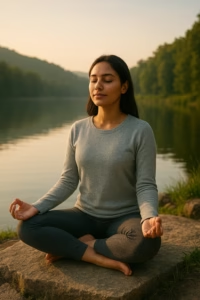
- “Imagine me meditating serenely in front of a waterfall with peaceful energy.”
- Career Success Prompt
- “Create an image of me as a confident leader in a contemporary office, inspiring a team.”
- Travel & Adventure Prompt
- “Depict me ascending a mountain peak, being joyful, liberated, and thankful.”
💡 Pro Tip: Include elements such as lighting, mood, or background to inspire more results.
4. How to Use Google Gemini AI Editor Images for Self-Improvement
Once you’ve created your Gemini AI prompts, don’t just save them to your gallery. Use them as daily reminders of your goals:
- Vision Board: Print them or create a digital board.
- Phone Wallpaper: Keep your future self visible every day.
- Journaling: Insert them into your planner or growth diary.
- Accountability Groups: Share with friends to stay motivated.
- Affirmations: Pair your AI image with daily positive affirmations.
5. Benefits of Using Google Gemini AI Editor for Personal Development
Here’s why AI prompts are more than just playful edits:
- 🌟 Boost Motivation :When you can visualize your desires, they become more tangible.
- 🎨 Spark Creativity: Writing prompts is like journaling creatively.
- 🚀Supports Mindfulness: AI edits can become meditative rituals.
- 💪 Build Confidence: Viewing a stronger version of yourself can change your self-perception.
- 🧘 Reduce Stress: Being able to enjoy lighthearted but substantial AI exercises can feel calming.
6. Potential Risks & Healthy Boundaries
Yes, Gemini AI is amazing, but let’s use it wisely:
- Don’t Compare Unrealistically: Don’t edit yourself to the unrealistic standard of the platform.
- Practice Privacy Respect: Upload pictures wisely.
- Maintain Balance: Use AI as a motivation tool—not a substitute for actual growth routines.
Use it as a journaling exercise for seeing yourself visually, not as a replacement for exercise, meditation, or career planning.
7. Step-by-Step Guide: Creating Your Google Gemini AI Editor Personal Growth Prompt
Here’s a straightforward workflow to use:
- Open Google Gemini AI Editor.
- Upload a bright, positive selfie.
- Type your preferred personal development prompt.
- Enhance details (mood, background, lighting).
- Save the photo & incorporate into daily routine.
8. The Future of Google Gemini AI Editor in Personal Growth
We’re only scratching the surface of what’s possible. Soon, AI like Gemini could:
- Create interactive vision boards.
- Offer AI coaching sessions with visual feedback.
- Track progress over time using your images.
- Blend with wearables & mindfulness apps for holistic growth.
This means AI won’t just be a productivity tool—it could be a personal development partner.
Coclusion
Google Gemini AI Editor is not only for going viral. Using the proper prompts, it can be a powerful tool for self-improvement. From imagining a healthier you, to a confident future self, or moments of mindfulness, AI makes it vivid and inspiring.
👉 Call to Action:
Have a go at your first personal development prompt today. Think about your future with Gemini AI—and take one small step towards that vision. For more insights on AI and personal growth, visit Mindliftly.
🙋♀️ FAQs
Q1: Can AI images really help in personal growth?
Yes. Visualization is supported by psychology. AI facilitates picturing goals clearly, increasing motivation and confidence.
Q2: Are Gemini AI prompts safe?
Yes, if used responsibly. Always use your own images and don’t share sensitive information.
Q3: How do I make prompts effective for growth?
Be descriptive: incorporate information on mood, objectives, and context of the future. The more specific the prompt, the more motivational the response.
Q4: Can Gemini AI replace traditional self-improvement methods?
No—just a helpful tool, not a replacement. You still have to have actual habits, effort, and discipline.
Q5: Is Gemini AI free to use?
Part of it is free; premium might provide additional edits and styles.
🔗 Internal References
- Top AI Meditation & Mindfulness Apps for Daily Calm
- Best AI Coaching Tools in 2025 [Free & Paid]
- AI for Decision Making: Smarter Choices in Less Time (2025 Guide)
- AI for Stress Management: Simple Ways to Feel Calm Every Day
🌍 External References
These show you rely on credible sources, boosting Google trust:
- Google Gemini AI official page
- Source: Google DeepMind – Gemini AI
- Anchor text: “Google Gemini AI official details”
- Visualization and Psychology Studies
- Source: American Psychological Association → articles on visualization & mental rehearsal.
- Anchor text: “psychology-backed visualization techniques”
- AI in Personal Development
- Source: MIT Technology Review → AI’s role in creativity and personal growth.
- Anchor text: “AI for creativity and growth”
- Healthline – Mindfulness Benefits
- Source: Healthline → benefits of mindfulness & stress relief.
- Anchor text: “mindfulness practices for stress relief”
About the Author
👤 Muhammad Ibrahim – Founder of Mindliftly
Muhammad Ibrahim is a technology writer and wellness advocate who loves to dig deeper into the potential of AI to enhance mental well-being, productivity, and personal growth. An experienced researcher with years of tracking emerging technologies, he brings scientific perspective and actionable strategies to guide readers to understand AI-fueled tools for daily calm and clarity.
Through Mindliftly, Ibrahim offers guides, comparisons, and action plans that link AI innovation to people’s well-being. His vision is straightforward: to enable humans to live more conscious, stress-free lives through responsible and effective use of AI.
📩 Connect with Muhammad:
- Website: Mindliftly.com


It’s incredibly frustrating when you have a clear vision in mind, but the AI just can’t seem to get the details right. You’re hitting on a key challenge: generating truly lifelike images goes beyond a simple prompt. It’s about thinking like a photographer and a director.
The AI models that excel at photorealism have been trained on vast datasets of real-world photography, and they understand the “language” of cameras. To get the best results, you need to speak that language.
Here’s a breakdown of how to move from basic prompts to professional-grade realism.
### 1. The Power of the “Technical” Prompt
Instead of just describing what you want to see, describe how a professional photographer would capture it. This gives the AI the specific parameters it needs to create a realistic image.
Start with a base prompt, then add modifiers in this order:
**`[Subject/Action]`**, **`[Environment/Setting]`**, **`[Composition]`**, **`[Style/Mood]`**, **`[Camera/Technical Specs]`**
**Example:**
* **Simple Prompt:** `A woman at a cafe.`
* **Effective Prompt:** `A close-up candid portrait of a woman in her 30s with shoulder-length hair, sitting in a bustling Parisian cafe on a rainy afternoon. Soft, diffused natural light from a window. Shallow depth of field, with the background blurred and the subject in sharp focus. DSLR photo, 50mm lens, f/1.8 aperture, cinematic quality, hyper-realistic, 8K resolution.`
### 2. Essential Keywords for Realism
You can save a lot of time by including these specific, powerful keywords in your prompts. They act as shortcuts for the AI to activate its photorealistic capabilities.
* **For Realism & Quality:**
* `photorealistic`, `hyper-realistic`, `ultra-realistic`
* `cinematic photo`, `editorial photography`
* `high-resolution`, `8K UHD`, `4K`
* `incredibly detailed`, `high-detail skin texture`, `realistic pores`
* `award-winning photograph`, `trending on 500px`
* **For Lighting & Atmosphere:**
* `cinematic lighting`, `volumetric lighting`
* `golden hour`, `soft shadows`, `dramatic side lighting`
* `backlit`, `rim light`, `studio lighting`
* `natural light`, `daylight`, `dusk`
* **For Camera & Lens Effects:**
* `DSLR photography`, `shot on Canon 5D Mark IV`
* `50mm lens`, `85mm lens`, `macro lens`, `wide-angle lens`
* `f/1.4 aperture`, `f/2.8`, `f/1.8` (low f-stops create a blurred background)
* `shallow depth of field`, `natural bokeh effect`
* `raw photo`, `unfiltered`, `high contrast`
### 3. Harnessing Your Reference Image
The image you provided is a perfect example of what to use for a powerful technique called **image-to-image** generation. Instead of starting from scratch, you can use a reference photo to guide the AI on composition, pose, and overall style.
Most advanced AI image generators (like Midjourney, Stable Diffusion, and Adobe Firefly) have this capability.
1. **Upload the image** you want to emulate.
2. **Add your detailed prompt.** The AI will use your image as a “scaffolding” and your prompt as the “paint” to create a new, unique image that maintains the core likeness and composition of your original.
You can get an excellent result by using the photo you provided and a prompt like: `photorealistic portrait of a woman with a calm expression, professional photography, soft studio lighting, high-resolution, sharp details.`
### 4. Choosing the Right Tool
The landscape of AI models changes fast, but a few have consistently been top performers for photorealism:
* **Midjourney:** Known for producing stunning, artistic realism with excellent lighting and atmosphere. It’s often considered the gold standard for artistic and commercial-level images.
* **Ideogram:** This model has a strong reputation for photorealism and its ability to handle text within images, making it useful for a wider range of projects.
* **Adobe Firefly:** A great choice if you use Adobe Creative Cloud. Its images are high quality, and it’s integrated directly into tools like Photoshop, allowing for seamless editing and refinement.
* **Stable Diffusion:** The go-to for customizability. It’s open-source, and there are countless community-trained models specifically for creating hyper-realistic human portraits.
Don’t be afraid to try different models. A prompt that doesn’t work well on one platform might produce a perfect image on another.
—
Creating hyper-realistic images is often an iterative process. Start with a solid, technical prompt, generate a few images, and then refine your prompt based on what’s working and what isn’t. With these techniques, you’ll be on your way to creating stunning, lifelike images.
“Thank you ever so much for showing us so vivid a vision! You’ve completely hit the nail on the head as to why prompts are usually more than a mere description can describe. Photographers and directors’ way of thinking — considering lighting, depth, composition, and camera details — is precisely what enables AI models to transition from ‘basic images’ to expert-level realism.”.
I particularly like that you broke it down into technical questions and keywords that are a must — that’s a goldmine for anyone having trouble with realistic outcomes. Tackling those layers (such as lens type, lighting aesthetic, or even the emotion of the shot) can totally make the output.
I’d add another tip for personal development projects: begin with a clear emotional intention. For instance, if the intention is mindfulness or stress reduction, add descriptive adjectives such as ‘calm,’ ‘peaceful,’ or ‘grounded.’ This way, the AI not only achieves realism but also fits the feeling you intend the image to evoke.
You’re right on the money that it’s a iterative process. Each iteration, each version, shows you how to make your prompt even better. And thank you again for sharing such great insights — this type of back-and-forth makes the AI + personal development arena so much more valuable!
Your article helped me a lot, is there any more related content? Thanks! https://accounts.binance.info/zh-TC/register?ref=DCKLL1YD
Thank you so much for your kind words! I’m really glad the article helped you. 😊
Yes — I’ll be publishing more related content very soon. In the meantime, you can also explore other posts on my website for similar topics.
If you have any specific questions or topics you’d like me to cover, feel free to let me know!